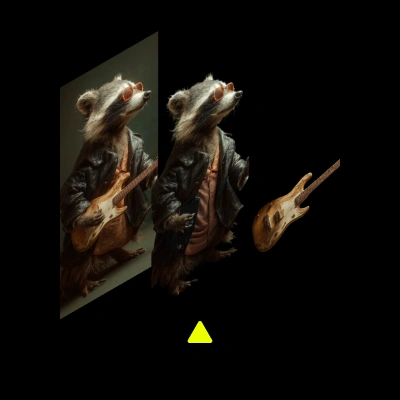
The Qwen-Image-Layered Control Decomposition workflow is designed to help users decompose an image into its constituent elements using the Qwen-Image-Layered model. This workflow is particularly useful for artists and designers who need to isolate specific parts of an image for further manipulation or analysis. The process begins with loading an image using the LoadImage node, followed by scaling it to the desired dimensions with the ImageScaleToMaxDimension node. The core of the workflow involves the f754a936-daaf-4b6e-9658-41fdc54d301d node, which utilizes the Qwen-Image-Layered model to perform the decomposition.
This workflow is technically robust, allowing for precise control over image layers, which can be saved using the SaveImage node. The MarkdownNote node is used to document the process and provide guidance throughout the workflow. This layered decomposition is beneficial in scenarios where detailed image editing is required, such as in graphic design, digital art, and even in scientific imaging where specific features need to be isolated and analyzed.
API
Use this workflow from code
Every Comfy workflow is a JSON graph. The payload below is this workflow, exactly as ComfyUI runs it — fetch it from the URL, keep it in version control, or load it in ComfyUI and run it node by node.
GET https://comfy.org/workflows/download/e5c914d15241.jsonFetching workflow JSON…
Run it from Python or TypeScript with the Comfy SDK. The same code targets Comfy Cloud or a ComfyUI you host yourself — only the base URL changes.
# Install (beta)
pip install comfy-sdk        # Python
npm i @comfyorg/sdk          # TypeScript

# Run "Qwen-Image-Layered Control Decomposition" (Python)
from comfy_sdk import Comfy

client = Comfy(api_key="comfyui-...")

# This workflow, exported in API format (see note below)
wf = client.workflows.from_file("image_qwen_image_layered_control_api.json")

asset = client.assets.from_file("input.png")
wf.set_input("74", "image", asset)  # LoadImage

job = client.run(wf)
for output in job.get_outputs("60"):  # SaveImage
    output.to_file(output.name)
The SDK takes a workflow in API format: open this workflow in ComfyUI and use File → Export Workflow (API). API access requires a Comfy Cloud plan with an API key. SDK docs · Get an API key
FAQ














